
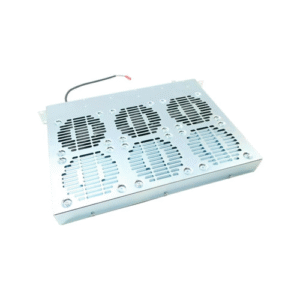
ABB PHARPSFAN03000 Fan Common Faults and Quick Troubleshooting Guide
The ABB PHARPSFAN03000 cooling fan supports critical automation equipment by sustaining stable airflow inside control cabinets. Because modern plants rely on continuous operation, every cooling component needs dependable performance. Therefore, engineers study the behavior of the PHARPSFAN03000 fan carefully and address issues as soon as subtle symptoms appear. This guide explores common failure signs, troubleshooting steps, and preventive actions that help engineers keep ABB automation cabinets safe and efficient. Furthermore, the article provides a deep technical view of fault mechanisms and field-proven diagnostic methods. To provide more value, the content also shares practical insights from Wuhan Yuli Automation Technology Co., Ltd. (www.wuhanyuli.com), a professional supplier of ABB Bailey-series replacement modules.
1. Why the ABB PHARPSFAN03000 Fan Matters in Industrial Environments
The PHARPSFAN03000 fan plays an essential role in cooling ABB Bailey control cabinets. Because temperature fluctuations affect module stability, the fan ensures consistent airflow around CPUs, I/O boards, power modules, and communication cards. When cooling performance declines, equipment temperatures rise quickly, and this trend influences signal accuracy, power stability, and even system uptime.
Moreover, the fan protects sensitive circuit boards from heat-induced stress, and it also reduces dust accumulation through controlled airflow. Therefore, the fan becomes a central reliability component inside DCS panels, especially in plants that run 24 hours per day.
2. Typical Symptoms That Indicate PHARPSFAN03000 Fan Issues
Although the fan operates with simple mechanics, several warning signs usually appear before a complete failure. Consequently, engineers must detect these early to avoid system downtime.
2.1 Airflow Decline
Airflow gradually decreases when dust builds up on the blades. Sometimes bearings develop friction, and airflow drops even faster. Since airflow reduction raises internal cabinet temperatures, system stability decreases.
2.2 Unusual Noise
Noise increases when bearings dry out or lose alignment. Slight vibration usually appears first, and the sound grows louder when mechanical wear expands. Although noise does not stop operation immediately, it always indicates future failure.
2.3 Irregular Start-Stop Behavior
The fan may start slowly or stop unexpectedly. This pattern occurs when power connectors loosen or when capacitors inside the fan assembly degrade. Because irregular operation causes temperature swings, engineers must investigate this symptom quickly.
2.4 Overtemperature Warnings
DCS panels include temperature sensors that trigger alarms when airflow becomes insufficient. When the cabinet heats up even though ambient conditions remain stable, the fan becomes the first component to examine.
2.5 Fan Does Not Respond
A complete stop indicates a power supply issue, an internal fan fault, or an obstruction that prevents rotation. Although non-responsive conditions seem obvious, the root cause often requires deeper diagnosis.
3. Step-by-Step ABB PHARPSFAN03000 Fan Troubleshooting Guide
To help engineers diagnose issues effectively, the following structured method covers all essential checkpoints. Moreover, every step encourages safe and systematic work habits.
3.1 Step 1 — Evaluate Cabinet Temperature Trends
Before checking the fan physically, engineers study temperature logs inside the DCS cabinet. When temperature increases follow a consistent pattern, airflow problems become one of the most likely causes. Although this step may seem simple, temperature data often reveals hidden issues.
3.2 Step 2 — Inspect Physical Mounting and Airflow Direction
Next, engineers examine the fan frame and mounting screws. Even slight loosening causes vibration, and vibration gradually damages bearings. Furthermore, airflow direction matters during installation. Therefore, engineers confirm that air flows as designed, either pushing air outward or drawing air inward depending on the cabinet design.
3.3 Step 3 — Check for Dust, Blockages, and Debris
Dust accumulation reduces cooling efficiency significantly. Because industrial environments often contain high particulate loads, fans accumulate debris rapidly. Engineers remove the module, clean the blades, and verify that ventilation paths remain clear. After cleaning, engineers check whether airflow improves.
3.4 Step 4 — Examine Electrical Connectors and Voltage Supply
Loose connectors create intermittent fan operation. Therefore, engineers check connector engagement, cable condition, and terminal integrity. In addition, they measure voltage to confirm the fan receives stable power from the cabinet supply. When voltage fluctuates frequently, engineers inspect upstream wiring or the power distribution module.
3.5 Step 5 — Evaluate Bearing Condition
Bearings represent the most common failure point. Consequently, engineers rotate the blade manually to sense friction or stiffness. If rotation feels rough, bearing wear likely causes airflow decline or noise. When bearings degrade, immediate replacement becomes the best solution.
3.6 Step 6 — Test Fan Start-Up Behavior
Engineers power the cabinet and observe the fan start. A healthy fan starts smoothly and reaches full speed quickly. When the fan starts slowly, engineers evaluate lubrication, bearing friction, and internal electronic components.
3.7 Step 7 — Check Vibration Levels
Vibration reflects misalignment, loose mounting, or unbalanced blades. Engineers measure vibration by touch or with vibration sensors. When vibration continues after cleaning and tightening, blade deformation may be the cause, and replacement becomes necessary.
3.8 Step 8 — Confirm Compatibility and Replacement History
Sometimes the fan fails early because the wrong model or non-original aftermarket product was installed. Therefore, engineers verify that the PHARPSFAN03000 is original and matches the intended ABB cabinet specification. Wuhan Yuli Automation Technology Co., Ltd. provides reliable sourcing channels to avoid compatibility problems.
4. Deeper Diagnostic Techniques for Complex Faults
When simple checks do not reveal the problem, engineers continue with more advanced methods.
4.1 Thermal Imaging
Thermal cameras reveal hot spots inside the cabinet. If hot zones appear around the CPU or power modules, airflow insufficiency becomes highly likely.
4.2 Current Measurement
By measuring fan current draw, engineers identify early electronic failures. Increased current may signal friction, while decreased current may signal internal motor issues.
4.3 Run-Time Analysis
Some fans degrade under continuous operation. Therefore, engineers review operational hours and compare them with typical fan lifespan. This analysis helps determine replacement timing.
4.4 Acoustic Analysis
Engineers use tools to identify abnormal noise frequencies that correspond to bearing wear, blade deformation, or mechanical imbalance.
5. Most Common ABB PHARPSFAN03000 Failure Modes Explained
To help engineers predict failures earlier, this section explains major failure modes.
5.1 Bearing Wear
Continuous high-speed rotation generates mechanical stress. As bearings dry out or degrade, friction increases, noise grows, and airflow declines. Because bearing damage accelerates rapidly, early action always helps avoid downtime.
5.2 Fan Motor Degradation
Internal coils and capacitors weaken over time. Therefore, the fan may start slowly or produce unstable rotation speeds.
5.3 Blade Deformation
Heat, vibration, or debris impact may deform blades. As a result, airflow becomes inconsistent and vibration increases.
5.4 Connector Fatigue
High-vibration environments gradually loosen connectors. Consequently, intermittent operation becomes a common symptom.
5.5 Severe Dust Accumulation
Dust buildup obstructs airflow and reduces cooling efficiency drastically. Therefore, regular cleaning extends fan lifespan significantly.
6. Quick Troubleshooting Table for Engineers
| Symptom | Likely Cause | Quick Action |
|---|---|---|
| Weak airflow | Dust, worn bearings | Clean fan, check rotation |
| Loud noise | Bearing damage | Replace fan |
| Fan stops | Power issue | Check voltage, reconnect cables |
| Vibration | Blade imbalance | Tighten mount, inspect blades |
| High temperature | Airflow drop | Clean cabinet, replace fan |
7. Preventive Actions to Extend Fan Lifespan
Because preventive maintenance helps avoid unplanned downtime, engineers follow these actions consistently:
Clean airflow paths regularly
Check connectors every maintenance cycle
Monitor temperature logs
Replace old fans before failure
Maintain spare units sourced from reliable suppliers
Wuhan Yuli Automation Technology Co., Ltd. supplies tested ABB PHARPSFAN03000 units and provides technical guidance for replacement planning.
8. Conclusion
Because ABB PHARPSFAN03000 fans support stable cooling inside automation cabinets, engineers must diagnose issues quickly to protect system reliability. By understanding symptoms, evaluating mechanical and electrical factors, and using structured troubleshooting steps, teams solve problems efficiently. Moreover, preventive maintenance ensures long-term performance and protects automation assets.